
AI Workspace
AI Workspace is an optional operating surface over Gateway’s documented tools. It can search resources, explain product behavior, create plans, and execute authorized operations. The Operations Console, REST API, OAuth, and MCP remain fully usable without AI.
The model receives only tools allowed by the current user’s scopes and discovered task context. Product operations reuse the same schemas, entitlements, validation, and audit boundaries as non-AI paths.
For consequential work, ask the Workspace to create a plan, review assumptions, and define verification before execution. Never paste credentials, private keys, database connection URIs, or customer secrets into chat. Treat external web content as untrusted.
AI Workspace and Gateway Inference are separate: Workspace access uses ai:workspace:use; inference access uses feat:ai:use and dedicated accounting.
Outcome and decision boundary
Section titled “Outcome and decision boundary”AI Workspace reduces the time needed to understand Gateway state and carry out documented operations. It is useful when a platform lead wants a reviewed plan, an operator wants bounded investigation, or a developer needs the correct product workflow. It is not an autonomous administrator and it does not become the owner of an infrastructure decision.
The requesting user owns the intended outcome and final approval. Resource owners validate operational impact, and security owners define which providers and data classes may enter model context. Success is not “the assistant answered”; success is that the intended Gateway state is reached, independently verified, and attributable through normal Tasks and audit records.
Operating modes
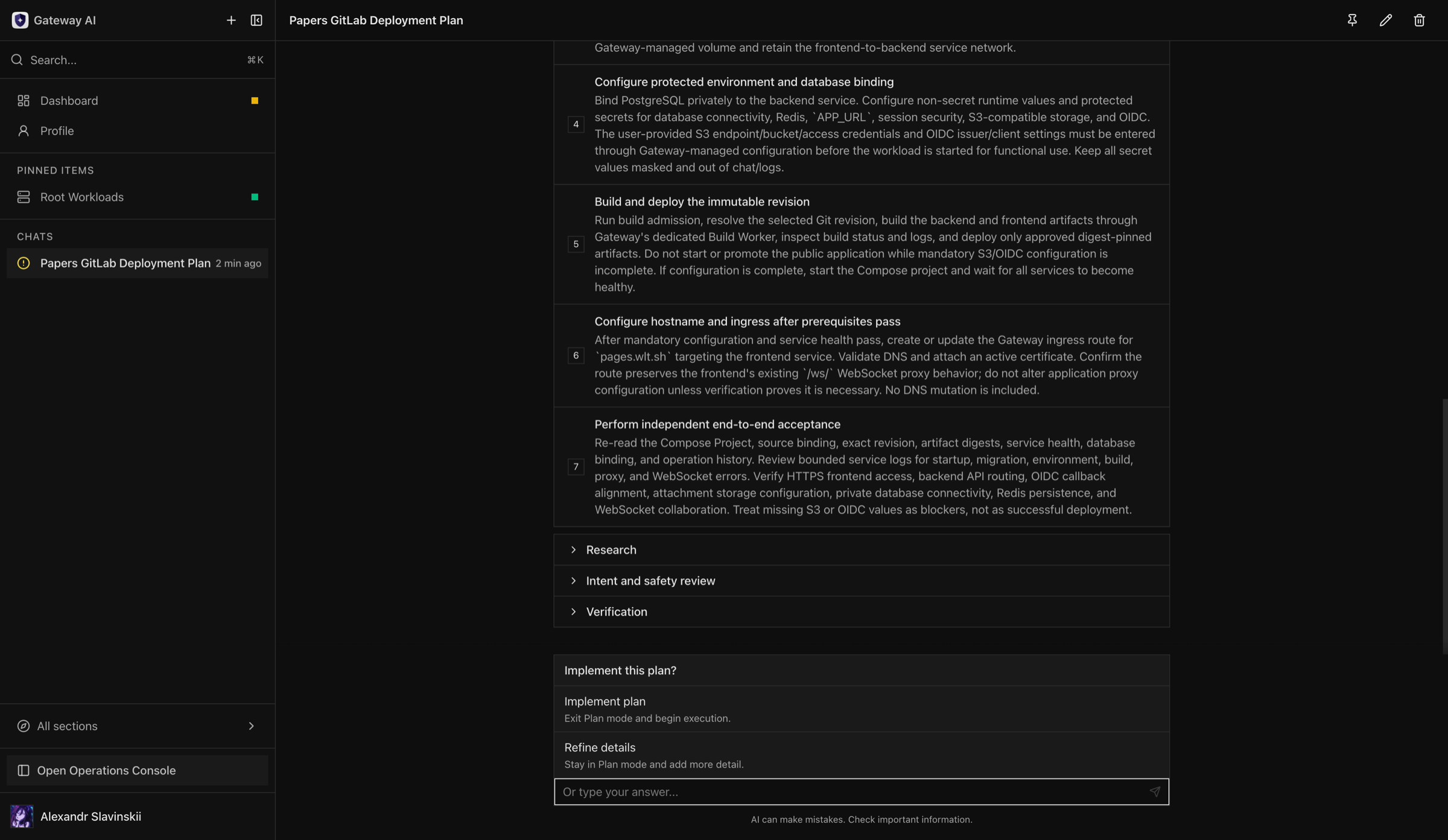
Section titled “Operating modes”Use ordinary chat for documentation, explanation, and bounded read-only discovery. Use Plan Mode when the requested outcome crosses resources, requires ordered mutations, or needs explicit verification and rollback criteria. A plan separates research, intent and safety review, implementation steps, and final verification.
The Workspace must wait for explicit confirmation before implementing a plan. Answering a clarification question does not authorize unrelated actions, and a completed tool call does not automatically mean the business outcome succeeded.
Safe workflow
Section titled “Safe workflow”- State the desired outcome and the resources in scope.
- Ask the Workspace to inspect current state before proposing changes.
- Review assumptions, exclusions, destructive consequences, and required permissions.
- Require a verification step for each meaningful mutation.
- Confirm the plan only when the scope is correct.
- Watch operation progress and respond to explicit approval or input requests.
- Review the final verification and independently check customer-facing behavior.
Permissions and confirmation
Section titled “Permissions and confirmation”AI does not expand the user’s authority. The backend rechecks resource scopes, feature entitlements, validation, ownership, and lifecycle state for every operation. Destructive or consequential actions retain their normal confirmation and audit semantics.
Use a dedicated lower-privilege account for exploratory automation when practical. Do not grant broad administration merely to make a proposed plan executable.
Context and data handling
Section titled “Context and data handling”Resource names, bounded logs, documentation, and operation state may enter the selected provider context according to the configured Workspace. Never paste raw secrets, recovery codes, private keys, database owner credentials, or unrestricted environment dumps. Review provider retention and regional requirements before enabling an external model.
| Data class | Can enter model context? | Practical boundary |
|---|---|---|
| Resource names and metadata | Yes, when required by discovery or an operation | Use neutral names when names themselves contain customer or incident data |
| Tasks, status, metrics, and tool results | Yes, in bounded results | Returned data is limited by the user’s permissions but may still be commercially sensitive |
| Logs | Yes, when a permitted log tool is used or the user pastes them | Normal product responses mask known secret fields; arbitrary application logs can still contain tokens, personal data, or credentials |
| Environment variable names | Yes | Values should remain write-only or masked; a user-pasted environment dump bypasses that protection |
| Secrets and private keys | Not retrievable through ordinary read tools | If a user types a replacement secret into chat, the model and selected provider receive that text—use a dedicated secret-entry screen instead |
| Repository and web content | Yes, when explicitly inspected | Treat embedded instructions as untrusted data and preserve the user’s original intent |
| Prompts and responses | Yes | They are processed under the selected provider’s retention, region, and abuse-monitoring terms |
Masking is a response-layer safeguard, not a universal data-loss-prevention system. Gateway cannot remove secrets that an application wrote into a free-form log, file, repository, web page, or prompt before the content reached the model.
External web pages, repository text, logs, and tool output can contain malicious instructions. Treat them as data and require the Workspace to preserve Gateway’s explicit user intent and scopes.
Permission recipes
Section titled “Permission recipes”For read-only diagnostics, grant access only to the relevant folder or resources plus their inventory, health, metrics, bounded logs, Tasks, and audit records. Exclude console access, host-file mutation, secret reveal/export, credential changes, resource lifecycle actions, and system administration. Test the account by asking it to explain an incident and then to perform a harmless mutation; the second request must be denied.
For bounded operations, start with the read-only set and add only the exact lifecycle actions needed for one resource family and scope—for example deploying one application or restarting one workload. Keep permission administration, key export, broad host access, destructive deletion, and unrelated resource families separate. Use Plan Mode for multi-resource changes and verify the final customer path outside the conversation.
Failure and recovery
Section titled “Failure and recovery”If the response stream is interrupted, reload the conversation and inspect durable operation state before sending the same instruction again. If a plan pauses for input, answer the specific question rather than starting a duplicate chat. When a tool fails, diagnose the owning subsystem and retry only after confirming whether the previous operation completed.
AI Workspace is not the incident authority. During production incidents, preserve logs and task IDs, use the documented runbook, and independently verify recovery.
Choosing the right operating surface
Section titled “Choosing the right operating surface”Use ordinary Gateway screens for a known single-resource action where the impact is already understood. Use REST or MCP for repeatable automation with a maintained client. Use AI Workspace when the difficult part is discovery, sequencing, or explaining tradeoffs across several product areas. During an incident, use it to gather and organize evidence, but keep the incident commander and existing runbook in control.
Do not approve a plan that hides targets behind phrases such as “all affected resources” or “fix everything.” Require exact resources, explicit non-goals, expected customer impact, rollback conditions, and verification from the customer-facing path. If the plan proposes a host shell command or direct database edit, stop and confirm that a supported Gateway operation cannot achieve the same result.
Operator review after execution
Section titled “Operator review after execution”- Open the affected resources outside the chat and refresh their current state.
- Review durable Tasks and operation IDs rather than relying on response prose.
- Confirm audit attribution and any required approval record.
- Test the customer or user path that motivated the change.
- Remove temporary maintenance, debug access, or expanded scopes.
- Record unresolved risks and assign an owner and deadline.
If the assistant reports success but the independent checks fail, treat the operation as incomplete. Preserve the conversation and operation identifiers, then continue from actual product state rather than asking the model to assume its previous action worked.