
Managed databases
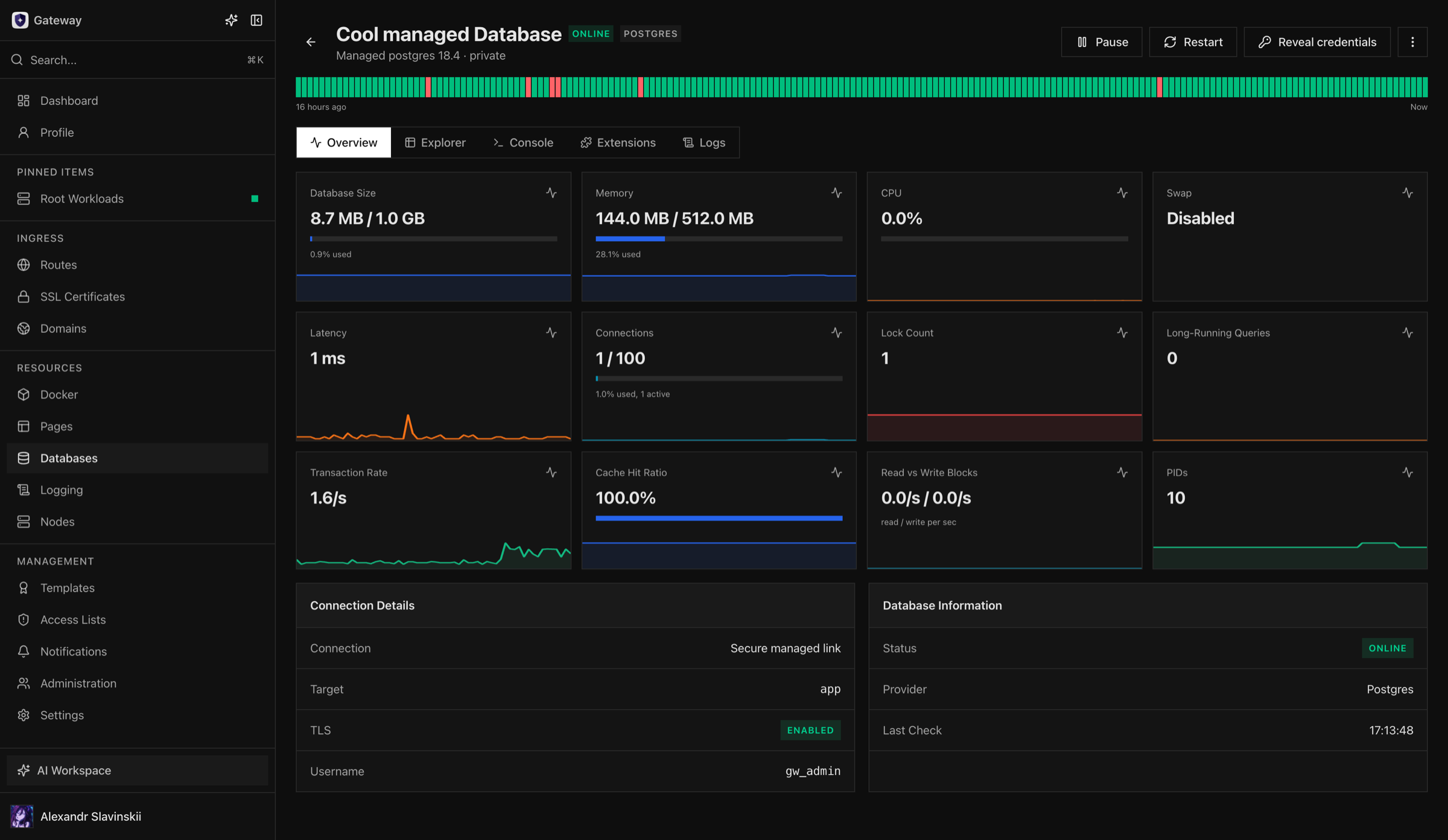
Managed databases provide Gateway-controlled PostgreSQL, Redis, and ClickHouse instances on database-profile nodes. Gateway owns the resource lifecycle and desired configuration; the database node owns the running engine and its local runtime. This separation is why an offline node does not erase the instance’s recorded configuration, and why recovery should begin with node health rather than manual engine changes.
The product decision is whether your team wants Gateway to own a bounded single-node database lifecycle or only record access to a database managed elsewhere. For a managed instance, the platform owner supplies a suitable Database Node, the database owner defines capacity, backup, and recovery requirements, and application owners consume the service through private bindings. Success means the instance is ready, data protection is proven, intended clients can connect with least privilege, and a Node or service restart has a documented recovery result.
Managed does not mean maintenance-free or automatically highly available. Gateway automates provisioning, configuration, monitoring, and lifecycle actions, while your organization remains accountable for data classification, backups, restore tests, engine upgrades, capacity planning, and business continuity.
Capability boundary
Section titled “Capability boundary”| Capability | What Gateway provides today | What the operator still owns |
|---|---|---|
| Provisioning | A bounded PostgreSQL, Redis, or ClickHouse instance on one Database Node | Node capacity, placement, storage durability, and approved engine version |
| Configuration and lifecycle | Desired configuration, start, pause, restart, resize where supported, publication, monitoring, and retirement workflows | Change windows, application compatibility, independent verification, and rollback decision |
| Application access | Managed private bindings and optional direct TLS publication | Client behavior, least-privilege use, certificate trust, and credential rotation policy |
| Backups | Backup and restore automation is not currently a ready managed-database feature | Engine-native backups, off-host storage, retention, encryption, and restore tests |
| Point-in-time recovery | Not provided automatically | WAL, AOF, or engine-specific continuous backup architecture and tested recovery procedure |
| Replication and automatic failover | Not provided by the bounded single-node managed lifecycle | Replicated topology, quorum, failover, fencing, and application reconnect behavior |
| Major-version upgrades | Not an unattended guarantee | Compatibility review, migration plan, backup, test restore, maintenance window, and rollback point |
| Disaster recovery | Gateway retains resource intent but does not recreate lost application data | Independent recovery location, data copies, keys, DNS/network recovery, and declared RPO/RTO |
If the service requires HA, PITR, cross-region recovery, or automatic failover, use an external database platform that provides those properties and register it in Gateway as an external connection. Do not infer database availability from the fact that its Gateway resource is healthy.
Before provisioning
Section titled “Before provisioning”You need permission to create the database and use the selected database node. Confirm the engine and supported version, node availability, storage and memory requirements, backup plan, and whether external client access is actually necessary. Select capacity conservatively and leave room for engine overhead, temporary work, and recovery operations.
Keep direct publication disabled unless an external client has a documented need. Private application connectivity should use bindings. Enabling direct publication is an intentional change to the instance’s exposure and does not open a host firewall automatically.
Read the curated version catalog in the UI before provisioning. Supported versions are an operational contract: do not pin an arbitrary upstream patch version or keep an obsolete engine only because its container can still start. For production data, document the upgrade path and restore compatibility before selecting a version.
Provision and verify
Section titled “Provision and verify”- Choose the engine, supported version, database node, storage size, and memory profile.
- Review the private-by-default network posture and any direct publication setting.
- Create the instance and follow the provisioning operation to completion.
- Wait for the instance to show Ready before creating an application binding or relying on Explorer, Console, or metrics.
- Verify engine health, recent logs, storage reporting, and a permitted connection path.
The first verification should include a write appropriate to the engine and a read-back through the same identity the real client will use. For PostgreSQL, verify the intended database and schema; for Redis, verify the expected key access and persistence policy; for ClickHouse, verify the target database/table path and both query and storage behavior. Remove synthetic data after the test.
Provisioning failures commonly result from unavailable nodes, capacity limits, storage preparation, unsupported engine settings, or engine startup. Read the operation result before retrying. Repeated restarts or recreation attempts can obscure the original failure and are not a replacement for correcting storage or configuration prerequisites.
Change an existing instance
Section titled “Change an existing instance”Pause and unpause control compute while retaining the database data. Expect normal health, metrics, Explorer, and Console actions to be unavailable while the instance is paused. Restart creates a brief service interruption and should be announced to dependent applications when they cannot reconnect automatically.
Resize only within the engine and storage constraints. Back up before a substantial capacity change, follow the resize operation, then verify storage reporting and application behavior. Credential rotation affects direct clients that use those credentials; application bindings retain their own engine identities. Certificate rotation can briefly recreate the database service, so clients must continue trusting the Gateway Database CA.
For a planned change, record a before-state: engine version, storage usage, connection count, current bindings, publication state, latest successful backup, and the operation owner. After the change, compare the same signals and run a real client query. If the operation fails, preserve its Task and engine logs before retrying; repeated blind retries can replace useful evidence with secondary failures.
Publication and retirement
Section titled “Publication and retirement”Direct TCP publication is opt-in and should be treated as a separate external-client contract. Verify the intended client, certificate trust, credentials, and network path after enabling it. Disabling publication removes that direct path but does not delete the instance or private workload bindings.
Deletion is destructive. First remove or migrate dependent bindings, decide how long backups must be retained, and confirm that no external clients still require direct publication. Gateway then removes the managed instance and its related identity and storage state through its lifecycle. Do not manually remove engine users, internal network objects, or storage in an attempt to accelerate deletion; let the recorded operation finish so cleanup remains consistent.
Operator details: storage and direct TLS
Section titled “Operator details: storage and direct TLS”The Databases Node must pass the same storage preflight used by the runtime. Gateway-managed databases use fixed-size preallocated ext4 images rather than an unbounded Docker volume. VM and bare-metal hosts normally provide the required loop and mount capabilities. Containerized hosts require explicit loop-device and mount support; an unsupported host is rejected instead of silently falling back to weaker storage isolation.
Direct publication uses native TLS. Gateway issues the server certificate from its separate Database CA and keeps the private key in daemon-owned storage outside the database image. PostgreSQL and Redis expose one TLS endpoint; ClickHouse exposes HTTPS and its native TLS endpoint. Clients must trust the displayed Database CA and should follow the documented hostname or certificate-fingerprint policy rather than disabling verification.
Recovery decisions
Section titled “Recovery decisions”- If the Node is offline, restore the Node and daemon connection before changing the database definition.
- If provisioning failed before the engine became ready, correct the reported storage, capacity, or version problem and use the targeted retry action.
- If the engine is ready but clients fail, separate direct-publication TLS, binding state, credentials, and application configuration before restarting anything.
- If storage is damaged or data is inconsistent, stop lifecycle experimentation and restore to a separate verified target from an engine-level backup.
Pause is not a backup and restart is not rollback. Gateway can reconcile infrastructure state, but it cannot reverse an application schema migration or reconstruct data that was never backed up.