
Publish a static site with Pages
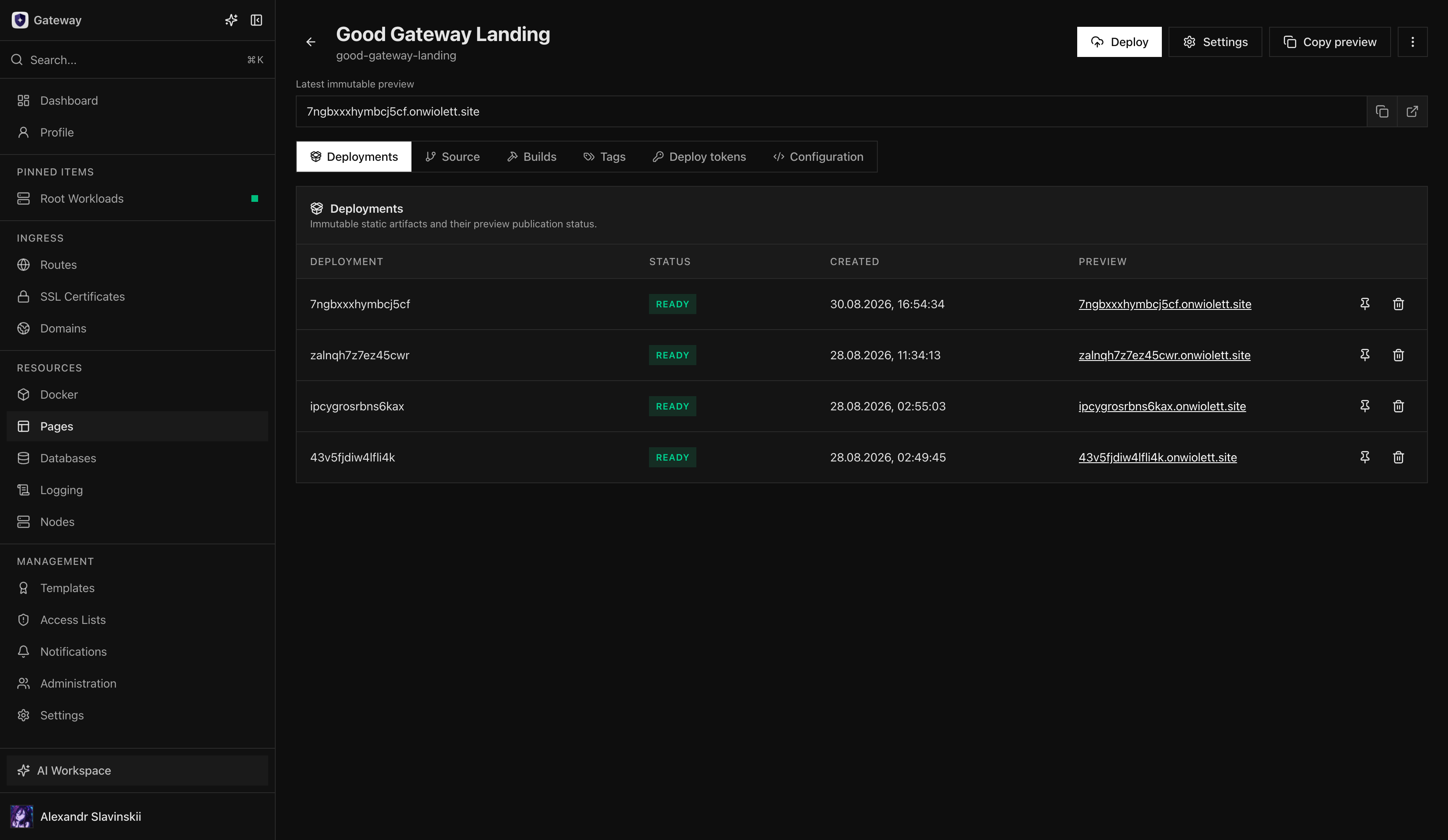
Gateway Pages publishes a static site as an immutable artifact with an explicit promotion pointer. A Deployment is one fixed set of files; a Tag is a movable name such as production; a Route sends a public domain to that Tag. This separation lets a team review a release and roll back by moving a pointer rather than changing files in place.
Pages is for static output—HTML, JavaScript, CSS, images, fonts, and other files served by nginx. It does not provide a server-side application runtime. A framework can be used during build, but its output must be a static artifact suitable for the configured artifact directory.
The Good Gateway landing site and the Good Gateway documentation portal are examples of sites that can run on Gateway Pages. Using the platform for its own public properties is useful operational proof, but those projects should still follow the same access, review, and rollback controls as customer sites.
Start with Pages overview. For Git delivery, prepare Pages Git deployments and a source-control integration. A custom domain also requires the Domain, Route, and TLS path.
Define the release contract
Section titled “Define the release contract”Before creating the project, decide:
- which Ingress Node or placement owns the static files;
- who can upload or build Deployments;
- which Tag represents production and who may move it;
- which Domain, certificate, and Route publish the Tag;
- whether source changes trigger automatic builds or automatic deployment;
- which client-visible runtime values are allowed;
- retention requirements for previews and rollback Deployments.
The project owns deployment history, Tags, runtime configuration, Routes, and retention behavior. The source repository—when used—owns source code, but it does not directly own the public Route.
Prepare the static artifact
Section titled “Prepare the static artifact”Build the site in a clean environment and confirm that the output directory contains the entry documents and all referenced assets. Test client-side routing and base paths using a static server rather than a development server. Development servers can hide missing files, server-only rendering, or incorrect asset URLs.
Do not include source maps, test fixtures, environment files, private repository metadata, credentials, internal topology, or build caches unless they are intentionally public. Everything inside a Pages artifact must be treated as downloadable public content, even if the user interface does not link to a file.
Manual artifact path
Section titled “Manual artifact path”- Enable Pages in feature settings and confirm the current plan allows Pages management.
- Create a Pages Project and select an eligible Ingress Node.
- Configure project quotas, retention, and access before uploading a production artifact.
- Upload the prepared artifact through the resumable deployment API or the authenticated remote MCP upload workflow.
- Finalize the upload. Gateway validates and creates a new immutable Deployment rather than modifying an older one.
- Open the immutable preview and verify the exact artifact.
- Move the system-managed
latestTag or a custom release Tag to that Deployment only after approval. - Create or update a Pages Route for the public Domain and selected Tag.
An interrupted upload is not a release. Resume or restart the upload through the supported workflow and finalize it once; do not manually copy partial files into an Ingress Node.
Git build path
Section titled “Git build path”On supported plans, connect an allowlisted GitLab, GitHub, or generic Git repository to the Pages Project. Select the branch and application root, allow Gateway to discover package.json where applicable, and configure the package manager, Node version, build script, and artifact directory.
The build runs on an isolated Build Worker. Add source-scoped Build Secrets only for build-time access; they must not be emitted into the static output. Review the exact commit, logs, vulnerability/policy result where available, worker, and produced artifact before publication.
Keep automatic build and automatic deploy separate. Automatic build can prepare a preview candidate on every approved source event. Automatic deploy moves a Tag and changes what a Route serves; enable it only when the branch protections and acceptance checks are strong enough for that risk.
Runtime configuration
Section titled “Runtime configuration”Pages can serve client-visible runtime configuration from /_gateway/pages/config.js as window.runtime.config. The value is public, capped at 64 KiB, and served with no-store. A Default object applies generally, and Tag-specific whole-object overrides can replace it for a routed Tag. Immutable previews use Default.
Use runtime configuration for non-secret values that legitimately vary by environment, such as public API origins, feature presentation, or analytics identifiers. Never place passwords, API keys, private endpoints, signing material, customer-only data, or network topology in it.
Changing runtime configuration does not create a new Deployment or change the artifact hash. Keep the configuration backward-compatible while a Tag may move between old and new releases.
Publish the Domain
Section titled “Publish the Domain”Create or select the Domain and certificate, then create a Pages Route targeting the chosen Project and Tag. Routes target Tags, not raw Deployments. This ensures that promotion and rollback remain explicit and recorded.
Verify DNS, TLS, the returned entry document, nested assets, client-side navigation, cache behavior, window.runtime.config, and error pages. Test from a clean browser session and an external network. An immutable preview proves the artifact; the public Route additionally proves DNS, TLS, Tag selection, and Ingress materialization.
Success criteria
Section titled “Success criteria”- The Pages Deployment is Ready and has an immutable preview.
- The intended Tag points to the reviewed Deployment.
- The public Route serves that Tag through trusted TLS.
- Static assets and client-side routes work from direct entry URLs.
- No secret or internal-only file is present in the artifact or runtime configuration.
- The deployment commit/build record is visible where Git delivery is used.
- A previous known-good Deployment remains available for rollback.
Rollback and cleanup
Section titled “Rollback and cleanup”To roll back, move the public Tag to the previous verified Deployment. Then retest the Route, assets, runtime configuration, and browser behavior. Do not edit or replace the failed Deployment in place; its immutable record is useful for diagnosis and proves what was actually released.
Deleting a Deployment can remove a rollback target. Review Tag references and retention requirements first. Deleting a Tag or Route changes reachability but does not alter the immutable artifact. Disable Pages globally only with an explicit product decision; disabling navigation is not a substitute for decommissioning public Routes and retaining required evidence.
Diagnostic map
Section titled “Diagnostic map”| Symptom | Check first | Detailed guide |
|---|---|---|
| Upload was interrupted | Upload status and Task; do not copy partial files manually | Tasks, events, and audit |
| Git build failed | Source settings, Build Worker, logs, and policy decision | Pages Git deployments |
| Preview works but public Route fails | Tag, Domain, DNS, TLS, and Ingress placement | Ingress troubleshooting |
| Direct URL returns 404 | Entry document, base path, and client-side routing | Pages Git deployments |
| Runtime configuration is wrong | Default, whole-object Tag override, and version compatibility |
Pages overview |
| No rollback target remains | Tag references and Deployment retention | Pages overview |