
Add your first node
A Node is a Linux host enrolled into Gateway for a specific operational role. The host runs a Gateway-managed daemon that reports its identity and capabilities and receives only the commands allowed for that role. Adding a Node does not move an existing workload automatically; it creates trusted capacity that you can select later.
Choose how to connect
Section titled “Choose how to connect”You can add a node in either of these ways:
- On your own server or VM: run Gateway’s generated installer command using the instructions below.
- Create a VM through Gateway: if you want to order a VM directly from the interface, connect a hosting provider and choose hosted creation in Add Node. Gateway creates the VM and installs the daemon. Wait for node readiness, not just provider power-on.
Successful enrollment means the node is Online with the intended role and capabilities.
Choose the role before enrollment
Section titled “Choose the role before enrollment”| Role | Use it for | Main ownership decision |
|---|---|---|
| Ingress | Routes, TLS materialization, Pages, nginx logs and traffic metrics | Which public addresses and ports this host owns |
| Docker | Containers, Deployments, Compose Projects, images, volumes, networks and runtime operations | Which workloads may share this Docker host |
| Databases | Gateway-managed PostgreSQL, Redis and ClickHouse | Storage, backup and stateful workload isolation |
| Build Worker | Isolated Git-source builds with BuildKit/containerd | Build egress and separation from reusable credentials |
| Monitoring | Supported monitoring collection | Which systems the Node may observe |
| Relay | Secure Link data-plane capacity and resilience | Reachable advertised address and physical fault domain |
Do not select a role merely because its installer happens to work on the host. A production role should match the host’s intended trust boundary, network placement, storage, and recovery owner. In particular, Build Workers and database Nodes should normally be dedicated to their purpose.
Before you create the Node
Section titled “Before you create the Node”Confirm that the target is a supported Linux host with root access or working sudo, correct system time, reliable DNS, and outbound reachability to the Gateway public gRPC target on 9443/tcp. The target is the Relay-backed control endpoint used by managed daemons; it may be a direct host or IP even when the Gateway web interface is behind a proxy.
Also confirm role-specific ownership:
- Ingress Nodes need the intended public listeners and a clear DNS/TLS operating model.
- Docker Nodes need a local supported Docker Engine and sufficient capacity for their workloads; the Node installer can prepare supported runtime components on a fresh compatible host.
- Database Nodes need eligible durable storage and the required loop/mount capabilities. Do not assume an ordinary restricted LXC guest is sufficient.
- Build Workers need a dedicated host or outer unprivileged container and an approved egress profile.
- Relay Nodes need an address and port reachable from participating Gateway, Docker, Ingress, and database hosts. Gateway does not open the firewall or traverse NAT for you.
Enroll the node on your own host
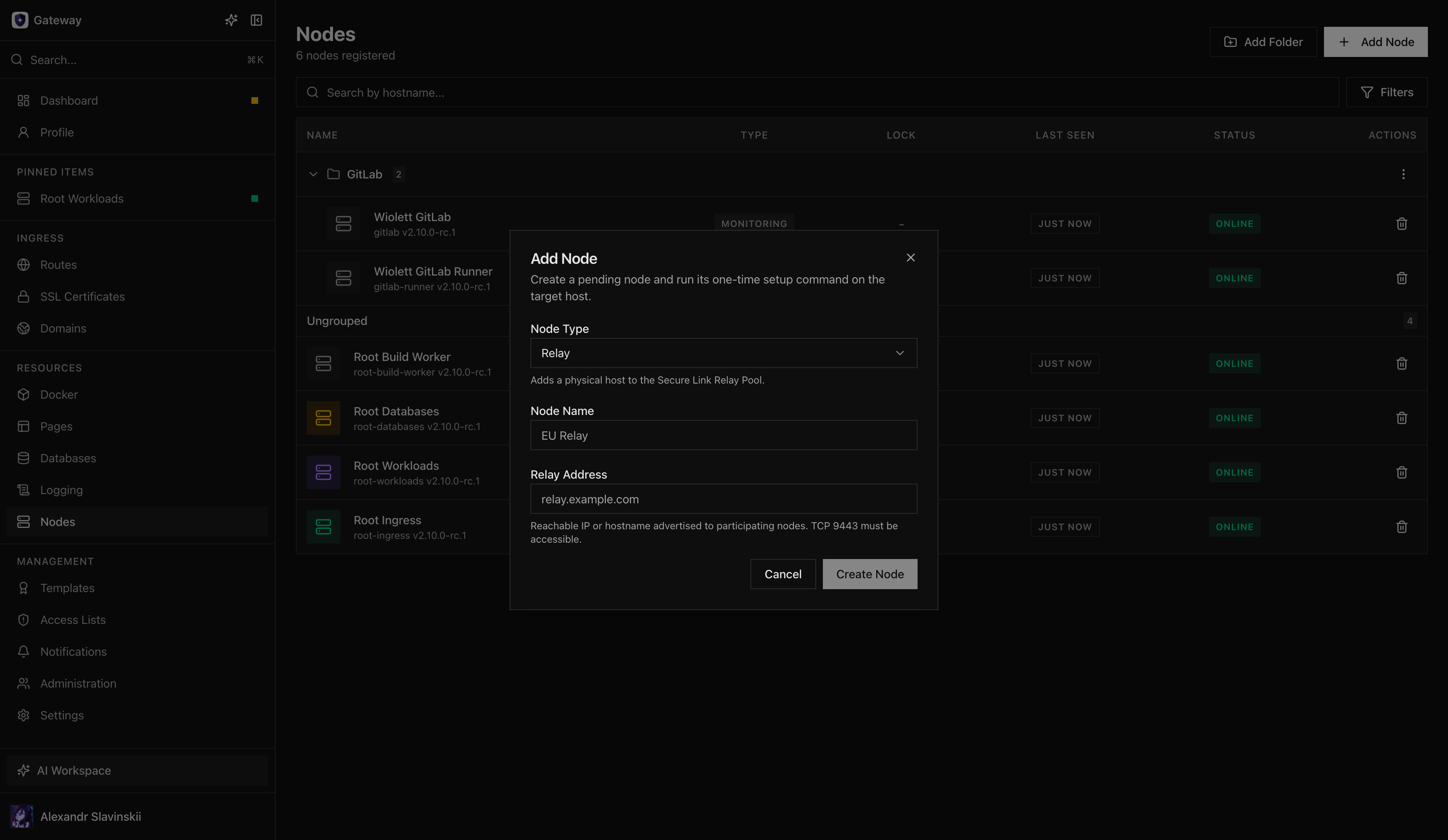
Section titled “Enroll the node on your own host”- Open Nodes and select Add Node.
- Choose the intended role. For Relay, enter the address that other participants will use to reach the Relay worker.
- Give the pending Node a recognizable name that describes its stable purpose, not a temporary ticket or person’s name.
- Create the Node and copy the generated installer command. It contains a one-time enrollment token and the expected Gateway certificate fingerprint.
- Run the command on the target host with the required privileges. Do not edit out the fingerprint or replace the generated Gateway address unless the configured public/local target is wrong.
- Keep the installation output until the daemon has enrolled and the Gateway UI shows the Node Online.
- Open the Node details and compare the reported hostname, role, operating system, version, addresses, and capabilities with the intended design.
The daemon verifies the pinned Gateway certificate before sending the one-time token. After successful enrollment, long-term authentication uses mutual TLS: both Gateway and the Node present certificates. The reusable relationship is the enrolled identity, not the bootstrap token.
Success criteria
Section titled “Success criteria”Treat enrollment as complete only when:
- the Node is Online, not merely created or pending;
- its type and hostname are correct;
- the reported version is compatible with the Gateway release;
- expected capabilities are present and no version-mismatch warning is shown;
- role-specific status is healthy;
- the Node reconnects after restarting its daemon service;
- a built-in update check can reach the configured release channel;
- the assigned operator has the scopes needed to view and operate it without broad system-admin access.
For Relay, successful enrollment makes the physical host eligible for the Relay Pool. Adding a healthy Relay does not automatically move existing endpoints; verify reachability and use the explicit rebalance operation when you intend to change placement.
Operator checks by role
Section titled “Operator checks by role”- Ingress: validate nginx configuration, inspect the service address, confirm ports 80/443 where required, and open bounded nginx logs.
- Docker: confirm inventory synchronization, runtime status, filesystem access, and any expected GPU or Secure Runtime capability.
- Databases: confirm the selected storage root, capacity enforcement, and preflight completion before creating a managed database.
- Build Worker: confirm BuildKit/containerd health, enforced resource profile, scanner availability, and the selected egress policy.
- Relay: confirm the supervisor and worker health, advertised endpoint, active-tunnel count, and fault-domain placement.
Failure and safe recovery
Section titled “Failure and safe recovery”If enrollment does not complete, keep the pending Node while diagnosing. Check the exact generated command, system time, DNS, outbound 9443/tcp reachability, certificate fingerprint, installer log, and daemon service log. A Cloudflare-proxied web hostname is not automatically a valid gRPC target.
Do not remove certificate pinning to make the connection succeed. That converts a configuration problem into an identity risk. Correct Settings > Gateway > General and generate a fresh command if the public or local gRPC target is wrong.
A pending Node can be deleted and recreated when you deliberately want a new enrollment identity. Never reuse an old one-time token. After enrollment, deletion has role-specific consequences: a Relay with active assignments must be drained, and a Node that owns workloads or data should be decommissioned through the relevant workload or database runbook rather than simply removed from inventory.
Next step
Section titled “Next step”With an Ingress or Docker Node online, continue with Publish your first Route. For role-specific production checks, use Node roles and installation and Node updates and offline behavior.