
Pages Git deployments
Connect and restrict the repository first using Git hosting. Connector access, Pages deployment permissions, and permission to view build history are separate checks.
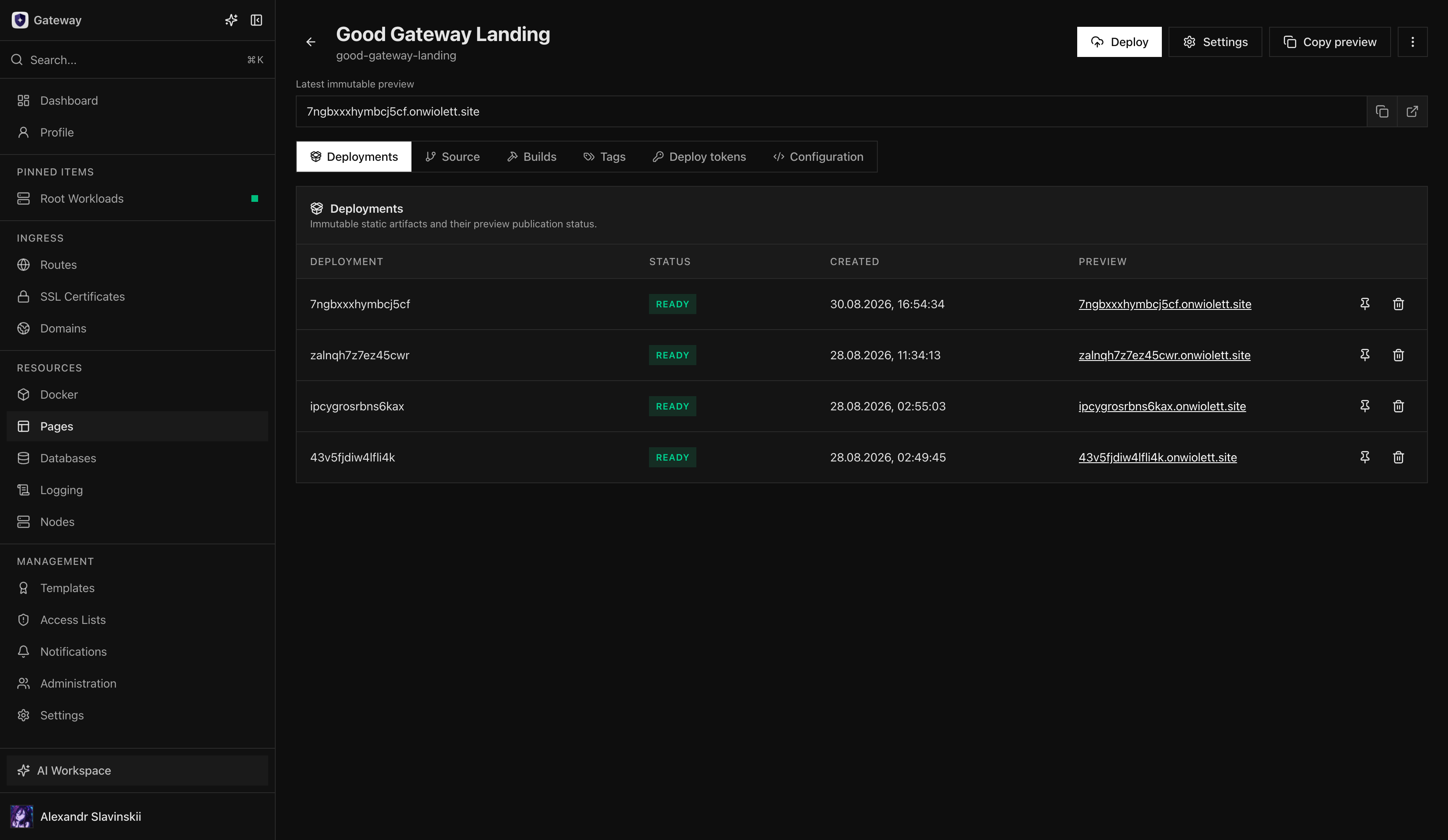
A Pages Git deployment turns one selected repository revision into a new immutable static-site Deployment. The Git source and Build Worker produce the artifact; the Pages Project owns the published deployment history; Tags and Routes control when that artifact reaches users.
The management decision is whether a successful source build should only create a reviewable candidate or also move a publication Tag automatically. Keep those controls separate until the team has a reliable preview, verification, and rollback process. A green build proves that an artifact was produced; it does not prove that the public Domain, TLS Route, or client runtime behavior is correct.
Git-backed Pages builds require a Business or Enterprise plan. Pages itself can still publish manual static artifacts on Personal and higher. This boundary lets teams use the same immutable deployment model even when source automation is not enabled.
Before you begin
Section titled “Before you begin”Connect a supported Git integration and choose a repository and branch that the integration is permitted to read. Confirm that a dedicated Build Worker is online, the project has the correct build definition, and required source-scoped Build Secrets are available. Build Secrets are for the isolated build boundary; runtime configuration is public and must not contain those secrets.
Review the repository’s package.json when it is used for build discovery, choose the appropriate package manager and build command, and ensure the output is a static-site artifact. A Git deployment does not make a server-side application runtime available through Pages.
The connector should have read access only to the selected repositories. The Build Worker needs enough capacity for dependency installation and the static build, but it should not share a mutable workspace with production workloads. Source-scoped Build Secrets are available only inside the isolated build boundary and must never be copied into generated static files or public runtime configuration.
Define success before enabling automation
Section titled “Define success before enabling automation”Record the expected branch, application root, package manager, Node.js version, build script, artifact directory, publish Tag, and responsible owner. Then define the acceptance check for the produced site: expected entry document, direct navigation behavior, asset loading, metadata, language Routes, sitemap or search index where applicable, and absence of secrets in the artifact.
Enable automatic builds when every relevant source update should produce a candidate. Enable automatic deployment only when every successful candidate may safely move the configured Tag. For documentation and marketing sites, automatic build with explicit production promotion allows the immutable preview to be reviewed first.
Build a deployment
Section titled “Build a deployment”- Select the repository, branch, and intended revision for the Pages Project.
- Configure build discovery, package manager, build command, and source-scoped Build Secrets.
- Start the build and follow the operation on its assigned isolated Build Worker.
- Review the redacted build log, policy result, source revision, and immutable output.
- Create or select the resulting Deployment, then test it before moving a production Tag.
The build is intentionally separate from publication. A completed build creates a candidate immutable Deployment; it does not change a custom Tag or Route. Automatic build and automatic deploy should be treated as independent controls, with automatic deploy enabled only after the health, promotion, and rollback path is understood.
Promote and verify
Section titled “Promote and verify”Move the intended Tag to the approved Deployment. Routes target that Tag, so the move is the promotion event. Verify the public domain’s DNS and TLS behavior, the returned document and static assets, client-visible window.runtime.config, and project operation status. Use an immutable preview where configured to inspect a specific artifact without moving a public Tag.
Keep a previous known-good Deployment available for the rollback window. Runtime configuration must remain compatible while the same Tag can select either release: changing it can alter site behavior without creating a new Deployment or changing artifact hashes.
Failed build, cancellation, and rollback
Section titled “Failed build, cancellation, and rollback”A failed or cancelled build must not change the active public release. Inspect the worker assignment and logs to distinguish source authorization, dependency, build command, Build Secret, policy, or artifact-output failures. Correct the cause and retry; each retry creates a new operation rather than mutating the historical result.
If a promoted release causes an incident, move the Route’s Tag back to the prior verified Deployment. Then verify the route response, assets, runtime configuration, and nginx application state. Do not edit or replace the failed Deployment in place: its immutable record is important for diagnosis and rollback evidence.
Operator details: build failure classification
Section titled “Operator details: build failure classification”Classify the failure before retrying:
| Failure area | Typical evidence | Safe next action |
|---|---|---|
| Source authorization | Repository or revision cannot be read | Repair connector permissions; do not broaden access to the whole organization by default |
| Dependency install | Lockfile, registry, or package-manager error | Reproduce with the same package manager and lockfile; verify only the required registry secret |
| Build command | Non-zero script exit or missing framework output | Fix the repository build and keep the failed job for comparison |
| Artifact contract | Output directory missing, empty, or not static | Correct the artifact directory or build output; do not publish a partial directory |
| Policy or admission | Build rejected before publication | Resolve the reported policy finding or obtain an explicit approved exception |
| Publication | Deployment exists but Tag or Route did not move | Inspect auto-deploy settings and the Pages operation; do not rebuild a valid artifact |
Cancellation stops the active build operation but does not delete previous Deployments or move an existing production Tag. Retrying a build keeps the original build’s exact commit SHA, which makes the retry reproducible even if the configured branch has moved. Start a new source build when the newer branch head is the intended input.
Manual releases and cleanup
Section titled “Manual releases and cleanup”A manual Pages release follows the same promotion model: create a new immutable Deployment from the prepared static artifact, verify it, and move a Tag only when ready. Git history is useful for provenance, but it is not required for a manual artifact to participate in the same Tag and Route lifecycle.
When disconnecting a Git source, decide which existing Deployments remain required for rollback. Removing the source stops future source-driven builds; it does not automatically unpublish an existing Tag or delete a deployed artifact. Review Tag references and retention before deleting any Deployment.
For sensitive repositories, review build logs before sharing them. Gateway redacts managed Build Secrets, but build scripts can still print repository content or derive sensitive values. Treat the build definition as production code and keep secrets out of commands, filenames, generated manifests, and client bundles.