
Connect an application to a private database
This journey gives an application private database access without publishing the database port and without sharing the database owner credential. Gateway creates a durable binding—the managed relationship between one workload and one database—and provisions a dedicated engine identity for that relationship.
If this is your first database workflow, read Databases overview, prepare a managed database, and review how application bindings behave before creating production data.
The platform owner controls connectivity, the database owner controls data lifecycle and backup, and the application owner receives only the connection material needed by that workload. Deleting application access and deleting the database are intentionally different operations.
Decide whether a managed database is appropriate
Section titled “Decide whether a managed database is appropriate”Use a Gateway-managed PostgreSQL, Redis, or ClickHouse instance when you want Gateway to own provisioning, runtime lifecycle, capacity settings, credentials, monitoring, and private workload bindings on a database Node. Use an external connection when another platform already owns the database lifecycle and Gateway only needs a governed connection record and supported operations.
Before creating data, approve:
- the database engine and supported version;
- the database Node and durable storage location;
- CPU, memory, swap, and storage limits;
- backup, retention, restore, and deletion ownership;
- whether direct TCP publication is genuinely required;
- which application resource will receive the binding;
- expected connection limits and application retry behavior.
Managed database deletion is destructive and removes its managed disk/image or mount together with the instance. A connection or binding deletion is not the same action. Make this distinction clear in operator permissions and runbooks.
1. Prepare the database Node
Section titled “1. Prepare the database Node”Enroll a dedicated Databases Node and verify its storage preflight. Database Nodes use fixed-size managed storage with enforcement at the host boundary. The installer checks the local Docker Engine and the loop-device, mount, write, growth, resize, unmount, and detach lifecycle used by managed instances.
A VM or bare-metal host normally exposes these capabilities directly. An LXC guest requires explicit loop-device and mount permissions from its outer host; Gateway does not fall back to an unbounded volume when the required boundary is absent.
The Node should be online, have enough unallocated storage for the requested database, and have a documented backup destination. Do not place application containers on a database Node simply because both use Docker internally.
2. Provision the database privately
Section titled “2. Provision the database privately”Open Databases, choose the supported engine/version, select the database Node, and configure the resource and storage limits. Keep Publish TCP disabled unless direct client access is a reviewed requirement. TCP publication and its host port are fixed at provisioning time; changing that endpoint requires recreating the managed instance.
Wait for provisioning and health checks to reach Ready. Confirm the displayed engine, Node, storage capacity, TLS state, and monitoring. Do not proceed from a merely created or starting state.
The owner credential shown by Reveal credentials is for controlled administration and recovery. It is not the credential to copy into every application.
3. Create the application binding
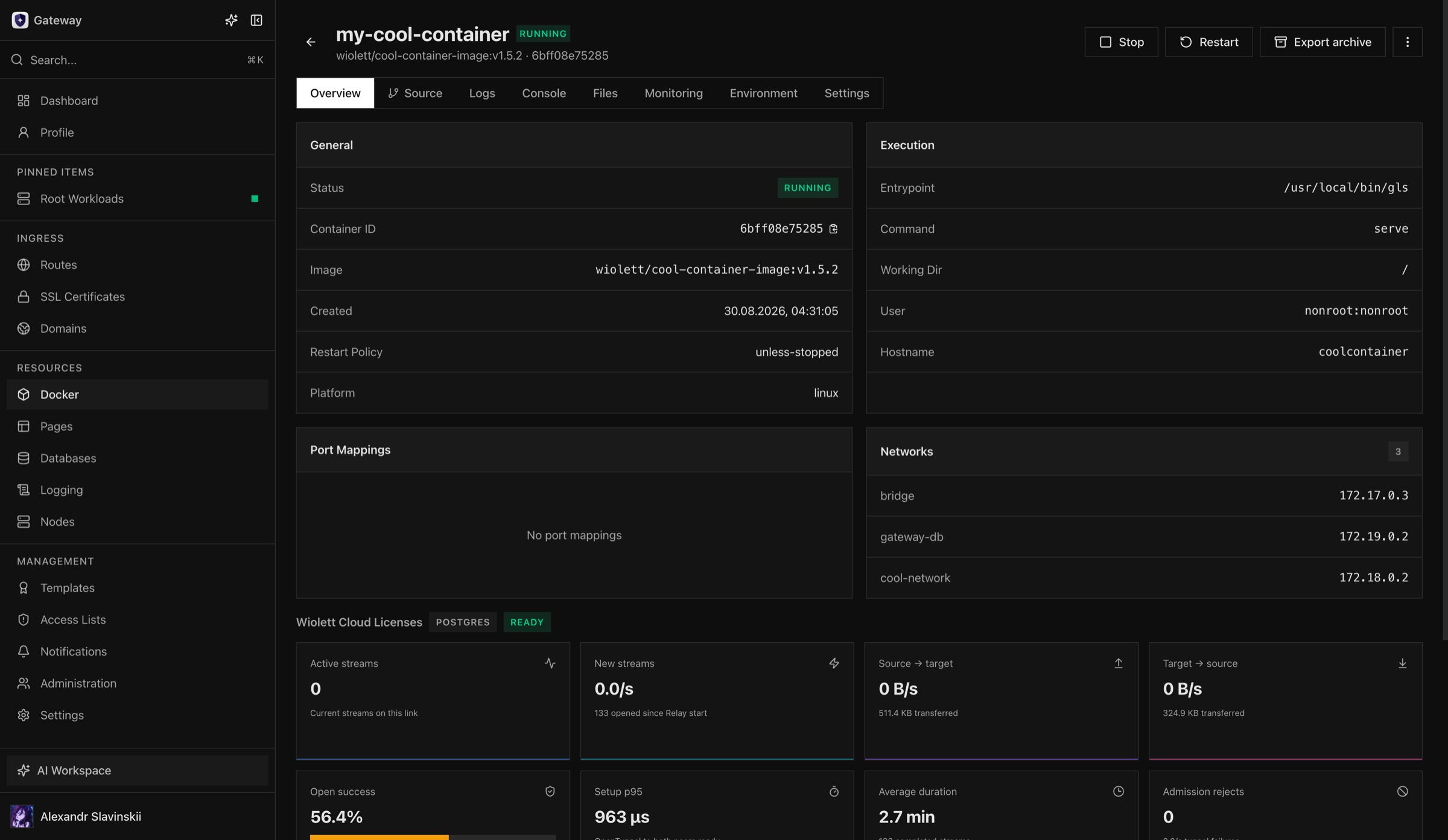
Section titled “3. Create the application binding”Open the target Container, Deployment, or Compose service and create a managed database link. Select the database and the supported connection variables/options. Gateway creates a distinct PostgreSQL role, Redis ACL user, or ClickHouse user for that binding.
For a standalone Container, Gateway attaches the private binding network and uses the normal recreate flow to apply the connection environment. For a Deployment, the desired configuration is updated and a slot rolls so future blue and green instances receive the same connector endpoint. Compose keeps the binding attached to the owning service rather than an ephemeral child container name.
Apply or recreate the workload only when the UI indicates that the changed runtime configuration requires it. The binding’s desired state is durable; a normal workload recreation must not create a new engine user every time.
4. Verify from the application
Section titled “4. Verify from the application”Use the application or a controlled diagnostic inside the workload to open a connection and perform a harmless engine-specific operation. Verify:
- the hostname, port, TLS mode, and database name come from the binding rather than copied owner credentials;
- the connection succeeds without publishing the database host port;
- the engine sees the binding-specific user;
- connection and query behavior matches the application’s pool settings;
- binding runtime telemetry becomes healthy and shows expected streams/traffic;
- workload logs do not print the secret values.
Then recreate the workload through its normal Gateway lifecycle and repeat the query. Restart the Docker daemon or reconnect the Node during acceptance testing and confirm reconciliation restores the listener and binding without producing an extra role. A Gateway application restart should not be treated as Relay maintenance; established data-plane behavior belongs to the long-lived Relay contract.
Expected guarantees and limits
Section titled “Expected guarantees and limits”- The workload does not receive the database owner credential.
- Each binding receives a distinct engine identity that can be revoked independently.
- Workload recreation preserves desired binding ownership.
- Binding deletion revokes its principal without deleting the database.
- New admissions fail closed when the required database, daemon, or Relay path is unavailable.
- Reconciliation restores daemon-owned listeners and validates the existing engine identity rather than creating orphan users for transient failures.
A private binding is not a backup, replication, or high-availability system. Database availability still depends on the managed instance, its Node, storage, and your recovery design. Relay updates are explicit data-plane maintenance and may interrupt tunnel sessions; application/control-plane updates and Relay maintenance are different events.
Failure and safe recovery
Section titled “Failure and safe recovery”If the binding is unhealthy, first identify which layer is unavailable: application workload, Docker Node, daemon-owned listener, Relay, database Node, database instance, engine identity, or TLS. Inspect bounded operation history and logs before changing state.
Prefer reconciliation or a targeted retry after correcting the root cause. Do not delete Gateway-owned networks, listeners, or engine users manually; that can turn a recoverable runtime outage into an ownership mismatch or orphaned cleanup problem. Do not publish the database port merely to bypass a private-link incident.
If application access must be removed, delete the binding and verify that its engine principal is revoked. If the database itself must be deleted, confirm backup/retention requirements and use the managed database deletion flow, understanding that its managed storage is removed. Keep those two decisions separate in change approval.
Diagnostic map
Section titled “Diagnostic map”| Symptom | Check first | Detailed guide |
|---|---|---|
| Database never reaches Ready | Database Node, storage preflight, engine version, provisioning Task | Managed databases |
| Binding is unhealthy | Database, both Nodes, Relay, listener, and engine identity | Application database bindings |
| Application is denied | Connection values, TLS mode, and the binding-specific principal | Database operations |
| Binding fails after a Node restart | Node freshness and reconciliation history | Node updates and offline behavior |
| Direct access is required | Published TLS port and network restrictions | Ports and network paths |