
Git to production
Git-backed delivery connects a reviewed source revision to an immutable artifact and then to the lifecycle of an owning Gateway resource. The source integration proves what may be read, the Build Worker owns isolated execution, the registry stores the artifact, and the Container, Deployment, Compose Project, or Pages Project decides whether that artifact reaches users.
This distinction matters to release governance: permission to build a repository is not permission to change a production Route, and a successful build is not automatically a successful deployment.
Git-source delivery is available only where the current plan entitlement permits it. Before designing unattended delivery, confirm that the target resource, integration type, automatic build, and automatic deploy behavior are all covered by the intended plan.
Before starting, prepare the source-control integration and Build Worker. For a static site, also review Pages Git deployments.
Define ownership and release policy
Section titled “Define ownership and release policy”Agree on these decisions before connecting production source:
- which integration and repository identity Gateway may use;
- which repositories and branches are allowlisted;
- who can edit source settings and Build Secrets;
- whether pushes trigger builds automatically;
- whether an approved build may deploy automatically or requires promotion;
- which vulnerability policy blocks an artifact;
- which exact user-facing checks define a successful deployment;
- who can roll back or cancel an in-progress operation.
Keep automatic build and automatic deploy separate. Automatic build creates a candidate artifact. Automatic deploy changes a running resource or Pages Tag and therefore carries a different risk.
Prepare the execution boundary
Section titled “Prepare the execution boundary”Configure a supported GitLab, GitHub, generic Git, or External SSH integration under Settings > Integrations. Grant the connector only the repository access needed for discovery and clone. Do not embed credentials in repository URLs.
Enroll a dedicated Build Worker and verify that it is Online and reports the execution, dedicated-runtime, and resource-enforcement capabilities required for build admission. A Build Worker uses dedicated BuildKit/containerd services and does not expose an ordinary Docker Engine socket to the builder profile.
Treat the outer Build Worker host or unprivileged system container as the security boundary. It processes repository-controlled input and must not contain unrelated workloads, cloud instance credentials, deployment keys, or control-plane secrets. The configured egress profile should match the build: public dependency downloads may be necessary, but metadata, private, and control-plane ranges should remain denied.
Connect the resource
Section titled “Connect the resource”- Create or open the target Container, Deployment, Compose Project, or Pages Project.
- Select Repository mode and choose the approved integration, repository, and branch.
- Configure the build context and Dockerfile, or the bounded Compose file and supported
buildfields. For Pages, select package-manager discovery, build script, Node version, and artifact directory. - Add source-scoped Build Secrets only when the build genuinely needs them.
- Decide automatic build and automatic deploy separately.
- Save the source configuration and review the resolved repository path before triggering a production candidate.
Build Secrets are mounted through BuildKit’s secret mechanism and redacted from supported logs. They are not ordinary build arguments and should never be copied into ARG, ENV, committed files, image labels, package-manager URLs, or shell tracing. A secret used during build can still be leaked by a malicious Dockerfile, so repository review remains part of the boundary.
Build and approve an artifact
Section titled “Build and approve an artifact”Queue the build and follow its durable job record. Review:
- the resolved branch and exact commit;
- the assigned Build Worker and target platform;
- build logs with expected secret redaction;
- vulnerability and policy results;
- the produced immutable digest or Pages artifact;
- cancellation, retry, or superseded status;
- the owning resource that will consume the artifact.
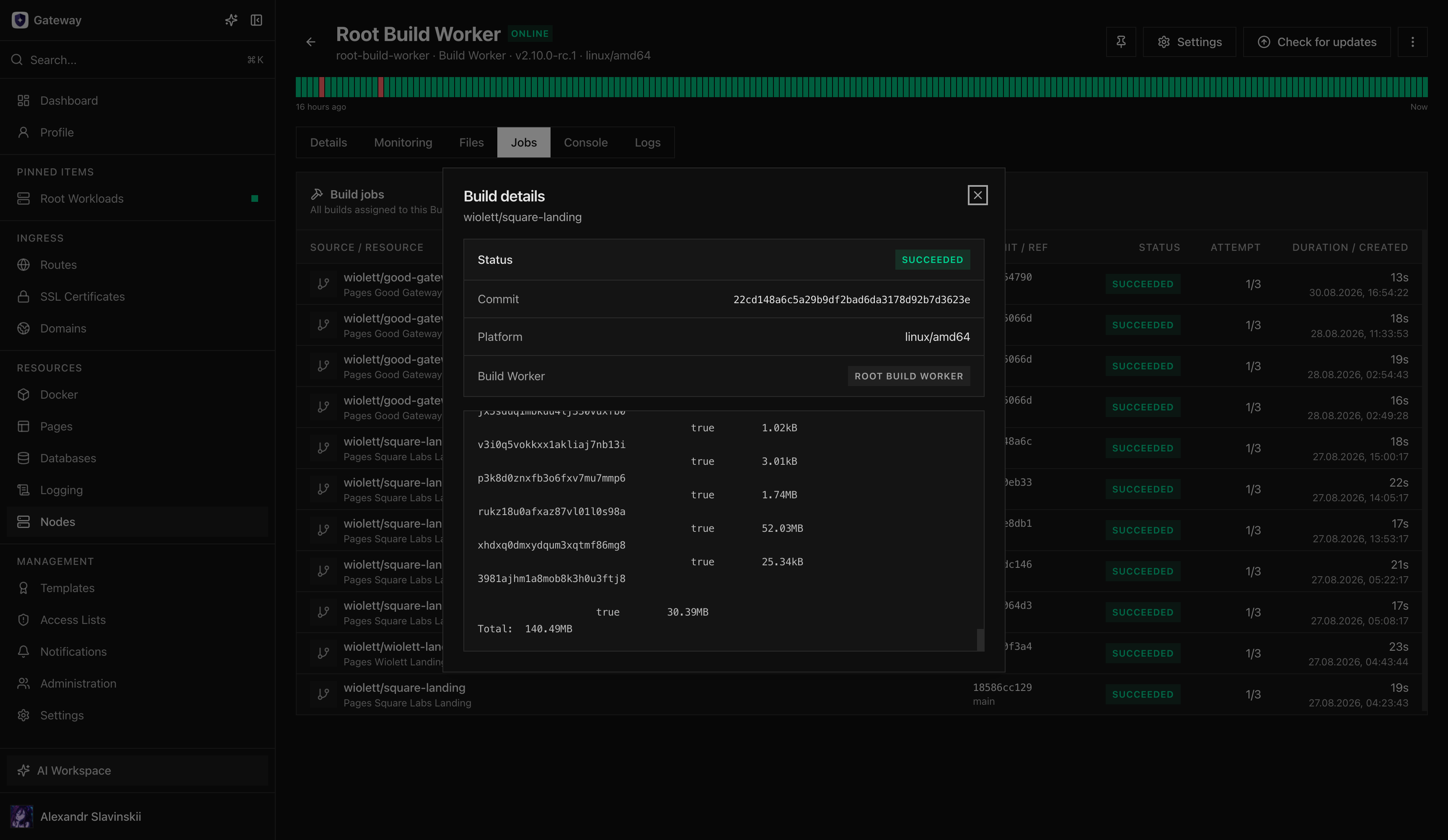
A build is releasable only when its policy decision is approved and the artifact is available in the configured registry or Pages deployment flow. Do not substitute a mutable image tag if a worker or registry outage prevents creation of the approved digest.
Compose batch behavior
Section titled “Compose batch behavior”A repository Compose file may create one child build for each service with a supported build section. Each Build Worker executes one build at a time, so a project can queue sequentially when capacity is limited.
Gateway waits for every expected child artifact to be approved before creating the digest-pinned immutable Compose revision. A failed, rejected, cancelled, or superseded child blocks the complete rollout. This is intentional: applying a mixture of old and new service images would make the source revision and runtime revision disagree.
Runtime-only networks and managed database overlays can be added to the deployed revision without rewriting the authored Compose source. Review the final revision rather than assuming the source file describes every Gateway-owned runtime attachment.
Deploy and verify
Section titled “Deploy and verify”Promote the approved artifact through the lifecycle of its owner:
- a Container uses a controlled recreate;
- a Deployment uses its health-checked blue/green rollout;
- a Compose Project creates and applies an immutable revision;
- a Pages Project creates an immutable Deployment and moves the intended Tag.
Verify the deployed digest or commit, runtime health, logs, public Route, and any database binding. For Pages, verify the returned HTML, assets, client-visible runtime configuration, and selected Tag. For Docker workloads, confirm that the target Node pulled the approved digest rather than a similarly named tag.
Record the last known-good artifact before promotion. A source rollback should be explicit: redeploy the prior approved digest or move the Pages Tag back. Rebuilding the same branch later may produce a different candidate if dependencies changed, so it is not equivalent to using the known-good artifact.
Failure and recovery
Section titled “Failure and recovery”Source discovery fails: check connector authorization, repository allowlisting, branch existence, and application root. Do not broaden the integration to an entire organization without review.
No worker accepts the job: verify worker status and required capabilities, registry writability, plan entitlement, and egress policy. Existing deployments remain valid; wait for safe build capacity instead of bypassing the immutable artifact path.
Policy rejects the artifact: review the findings and policy threshold. Fix or explicitly change policy through the approved security process; do not relabel the same digest as trusted.
Deployment fails after a successful build: keep the build record. Diagnose the owning resource, health check, Node capacity, secrets, and external dependencies. A build success proves artifact creation, not runtime correctness.
Automatic delivery creates risk: disable automatic deploy first while keeping automatic builds if useful. This preserves candidate generation without changing production on every source event.
Diagnostic map
Section titled “Diagnostic map”| Symptom | Check first | Detailed guide |
|---|---|---|
| Repository is not discovered | Connector authorization, repository allowlist, branch, application root | Source-control integrations |
| Build Worker does not accept the job | Node status, capabilities, plan, registry write access | Git sources and Build Workers |
| Build is rejected | Policy findings and blocking threshold in the build record | Git sources and Build Workers |
| Artifact exists but deployment fails | Deployment Task, target Node, logs, health check | Tasks, events, and audit |
| Image cannot be pulled | Registry reachability, digest, and stored credentials | Registries and image trust |
Preserve the build ID, Task ID, exact commit, and error before retrying. A new build can hide whether the earlier candidate completed, failed, or is still running.